
miniWE - X 64-bit Download
Popular x64 Tags
- menu x64 download
- control x64 download
- run x64 download
- start x64 download
- hotkey x64 download
- security x64 download
- taskbar x64 download
- windows x64 download
- launch x64 download
- task manager x64 download
- desktop x64 download
- launcher x64 download
- shortcut x64 download
- application x64 download
- fast x64 download
- tray x64 download
- program x64 download
- manager x64 download
- startup x64 download
- utility x64 download
- process x64 download
- performance x64 download
- antivirus x64 download
- macro x64 download
- 2000 x64 download
- spyware x64 download
- anti spyware x64 download
- virus x64 download
- trojan remover x64 download
- trojan x64 download
miniWE 3.0.0.16
Sponsored links:

JMC Spot

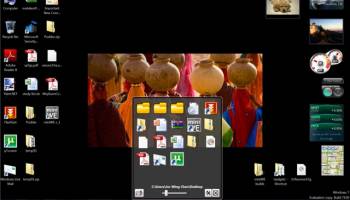
miniWE is a free .Net3.0 application. It is a combination of Quick Launch Bar and Windows Explore. When you click the program, it will pop up as an app launcher. In addition, it has the ability to browse through folders like a Windows Explore (some folders like MyDocument are not accessible under Windows Security System). When you click on the file, it will be launched by default program and miniWE will be minimized. When you click miniWE again, it will pop back up under your Main Page Folder. Main Page Folder is default to Desktop Folder as seen in the following picture, but, you can set it to any folder you like.
Why?
If you have a lot of apps, this is an easy way to organize your apps. No more double click on a folder of shortcuts. No more closing the folder window after you launch an app. You can also group documents and many other files as well.
Featuring:
Navigate through folders, open files, launch program 3-in-1.
Drag & drop files/folders to add “Shortcut” to main page folder.
Main page folder, icon size, column count, and file name display are all customizable.
Show picture thumbnails (additionally, one per folder as well).
Use the wizard to create more miniWE to target different Main Page Folders.
Allow to open main folder right away. This is a good alternative for pinning a folder in Windows 7.
Why Make More miniWE Shortcuts?
You can make miniWE points to different folders when you create a shortcut using different ID number. Meaning you can have a miniWE points to Desktop, one to Download, one to My Document, and etc.. And you can customize shortcuts to any icon you like, so, you don't get confused which miniWE points to which folder.
Why?
If you have a lot of apps, this is an easy way to organize your apps. No more double click on a folder of shortcuts. No more closing the folder window after you launch an app. You can also group documents and many other files as well.
Featuring:
Navigate through folders, open files, launch program 3-in-1.
Drag & drop files/folders to add “Shortcut” to main page folder.
Main page folder, icon size, column count, and file name display are all customizable.
Show picture thumbnails (additionally, one per folder as well).
Use the wizard to create more miniWE to target different Main Page Folders.
Allow to open main folder right away. This is a good alternative for pinning a folder in Windows 7.
Why Make More miniWE Shortcuts?
You can make miniWE points to different folders when you create a shortcut using different ID number. Meaning you can have a miniWE points to Desktop, one to Download, one to My Document, and etc.. And you can customize shortcuts to any icon you like, so, you don't get confused which miniWE points to which folder.
OS: Windows XP, Windows Vista, Windows Vista x64, Windows 7, Windows 7 x64, Windows 8, Windows 8 x64, Windows 10, Windows 10 x64
Requirements: .NET Framework 3.0
Add Your Review or 64-bit Compatibility Report
Top Launchers & Task Managers 64-bit downloads


QuickWayToFolders 1.4.2
Streamline your file navigation with QuickWayToFolders for effortless access.
Open Source

EF Process Manager 24.03
Shows you comprehensive information about which modules/processes have opened.
Shareware | $14.50


StartGen 4.0
Create innovative personal start menus, generate mobile start page & collaborate
Freeware


VistaSwitcher 1.1.5
The most elegant and powerful Alt-Tab task switcher with full-sized previews
Freeware
tags: switch, windows, alt-tab, preview, snapshot, instance switcher, manage windows, multiple monitors, vista

Automatically Kill Processes Software 7.0
Automatically kill specific running EXEs at specific intervals.
Shareware | $19.99
Members area
Top 64-bit Downloads
-
WinRAR (x64) 7.01
x64 trialware download -
GSview x64 5.0
x64 freeware download -
eM Client Converter 2.0
x64 shareware download -
XtraTools Home x64 25.11.1
x64 shareware download -
HWMonitor (64-bit) 1.53
x64 freeware download -
Windows 7 x64
x64 trialware download -
ASUS Fan Xpert 4.0
x64 freeware download -
WCD for Windows (x64
bit) 6.0.5
x64 open source download -
ConsoleZ x64 1.17.1
x64 freeware download -
O&O Defrag Free
Edition x64 14.1 B431
x64 freeware download
Top Downloads
-
Outbyte Driver Updater 2.0.2.57454
shareware download -
Speccy 1.32.740
freeware download -
Stellar Repair for
Access 7.3.0.4
demo download -
Drive Snapshot 1.50 - Jul 17 2024
trialware download -
Syncios WhatsApp
Transfer 2.4.9
shareware download -
Leawo iPhone Transfer 1.9.1.0
shareware download -
Android Data Recovery
Software 8.1.3.5
shareware download -
Photos Undelete Program 5.2
shareware download -
Cok Wechat Recovery 4.5
shareware download -
Norton Ghost 15.0.0.35659
trialware download -
AceThinker iOS Data
Backup & Restore 1.0.6
shareware download -
DirPrintOK 7.48
freeware download -
WinBin2Iso 6.55
freeware download -
BlueStacks 5 5.21.210.1023
freeware download -
Automize 11.16
shareware download